For pest-control businesses
Keep repeat service clear from office to field.
Why this helps
Turn repeat service into a reusable plan with one owner, a clear field handoff, visible issues, and useful service history.
- Plan
- Do
- Review
See the mobile handoffOpen the assigned pest-control visit on mobile.
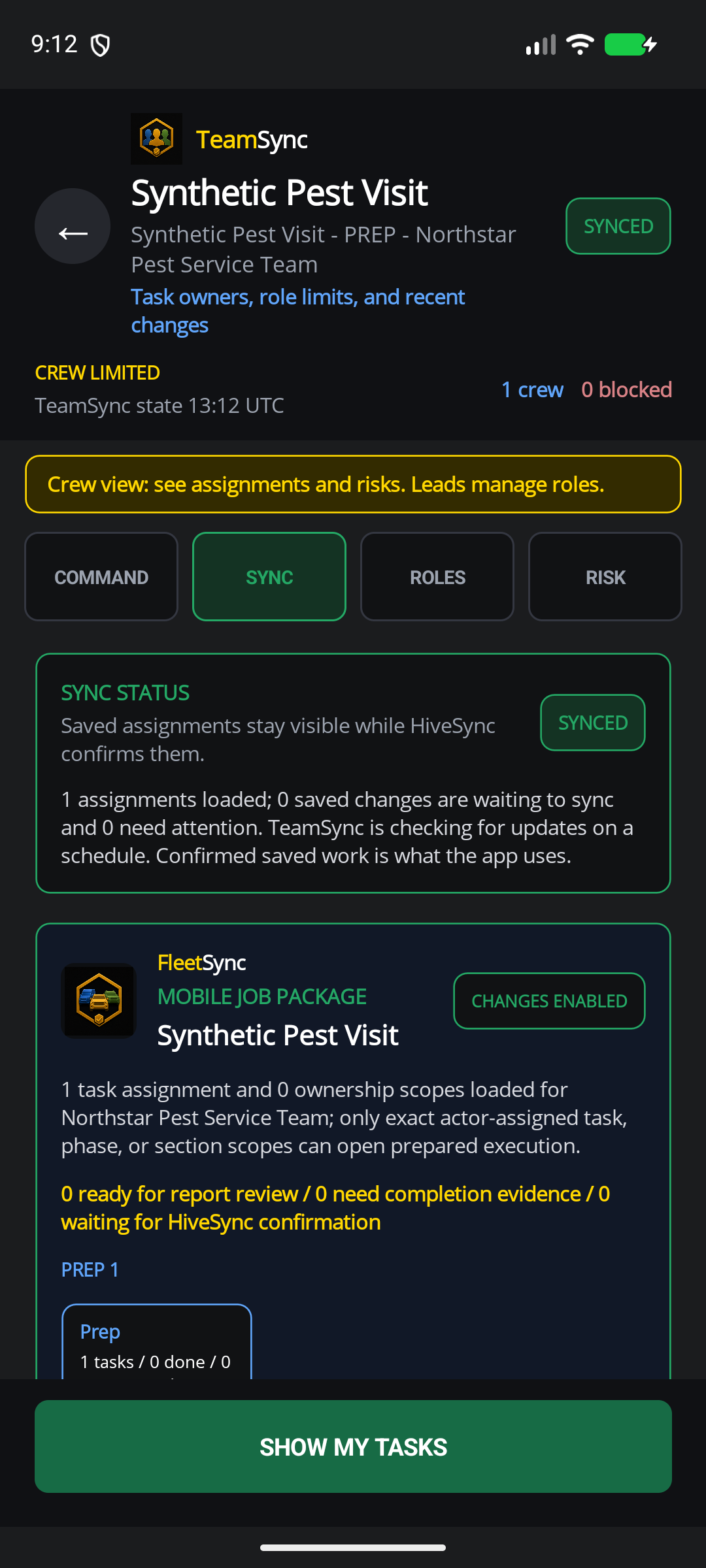
Mobile TeamSync handoff for pest-control field work
Open the assigned pest-control visit on mobile.
This made-up pest-control visit shows ownership and a mobile handoff. It does not choose treatments, prove compliance, track a live location, or mark the service complete.
Mobile app
Repeat pest-control work
Keep the current visit, field owner, and service history together.
Why this helps
Connect repeat service to a clear handoff without making treatment or compliance claims.
Keep service history intact
Benefit details
Connect the current visit to prior results, exceptions, completion evidence, and the next client follow-up.
Show who owns the visit
Use TeamSync to show the current owner, handoff status, and next action.
Share what you know
Benefit details
Approved creators can publish work Blueprints or clearly labeled recommendations without claiming certification or income.
Choose a plan
Choose the option that matches your work.
See the pricing page for current prices, limits, checkout, and access.
Subscription plan
Team
Team workspace plan The crew path for shared assignments, handoffs, templates, and completion history. Coordinate shared workspaces, named owners, role-aware handoffs, shared templates, and team reporting. Compare TeamSee other access options
Subscription plan
Pro
Solo professional plan The recommended starting point for a solo operator building repeatable service and client history. Build a repeatable solo practice with expanded workflows, publishing, creator tools, and client-ready reporting. Compare ProCompare more ways to buy
Check the pricing page for current prices and access. Comparing an option does not buy it.
See all stepsEach step shows the owner, the next action, and what changes when plans change.
How the work flows
Move from a reusable plan to a finished result.
Each step shows the owner, the next action, and what changes when plans change.
- 1
Choose the repeat work
Start with a service Blueprint you own and useful client history.
- 2
Set the current visit
Add the due date, site notes, and known changes.
- 3
Choose the field worker
Assign one approved technician and open the TeamSync job on mobile.
- 4
Keep the record
Save completed work, issues, client notes, and follow-up history together.
Explore RecurSync and related featuresEach card shows current availability and links to a simple feature guide.
Features for this work
Use only the features you need.
Each card shows current availability and links to a simple feature guide.
 Planned invite-only pilot
RecurSync
Review the invite-only repeat-service path; no schedule or checkout is created.
Planned invite-only pilot
RecurSync
Review the invite-only repeat-service path; no schedule or checkout is created.
 Selected teams
TeamSync
TeamSync connects named owners, role-aware assignments, queued field updates, and confirmed completion history without pretending every update is live.
Selected teams
TeamSync
TeamSync connects named owners, role-aware assignments, queued field updates, and confirmed completion history without pretending every update is live.
 Creator + promoter
EarnSync
EarnSync connects creator Blueprints, storefronts, promotion, and confirmed earnings. Clicks and estimates do not mean money is owed to you.
Creator + promoter
EarnSync
EarnSync connects creator Blueprints, storefronts, promotion, and confirmed earnings. Clicks and estimates do not mean money is owed to you.
What you can use nowOrganize visits. Keep treatment decisions with trained people.
What you can use now
Organize visits. Keep treatment decisions with trained people.
HiveSync can organize a work Blueprint, assign the visit with TeamSync, record issues, and keep completed-work history. It does not choose products, doses, treatment methods, restricted procedures, or license rules.
- Share only the client, site, and service details the assigned person needs.
- Show waiting, failed, and confirmed updates as different results.
- Keep product choices, application, labels, licenses, safety, and legal rules with trained people.
What comes later
Automatic RecurSync scheduling, route planning, constant live tracking, chemical choices, compliance certification, and automatic treatment are not available now.
Read common questions4 answers
Questions and answers
Common questions
Does HiveSync choose a treatment or product?
No. HiveSync helps plan and record the work. It does not give chemical, application, license, safety, or legal guidance.
Does it schedule every future service visit?
No. RecurSync is available only to selected pilot accounts. Keep using your current scheduling system unless your pilot agreement says otherwise.
Can a pest-control expert publish a Blueprint?
Possibly, when they own or have permission to use the material and it passes review. HiveSync does not certify the creator.
Which plan fits a small pest-control business?
Pro is the recommended solo starting point. Team fits shared field ownership; neither plan alone grants RecurSync pilot access today.
Keep the next service visit connected.
Start with the service plan you can use today.
Next-step details
RecurSync remains a selected-provider pilot.