For movement professionals
Give each practice task one clear owner.
Why this helps
Coordinate non-clinical practice work with named owners, client-safe operational notes, and reviewable handoffs. Keep diagnoses, treatment notes, and medical records out.
- Plan
- Do
- Review
See it on web and mobileWrite on web. Follow the timed task on mobile.
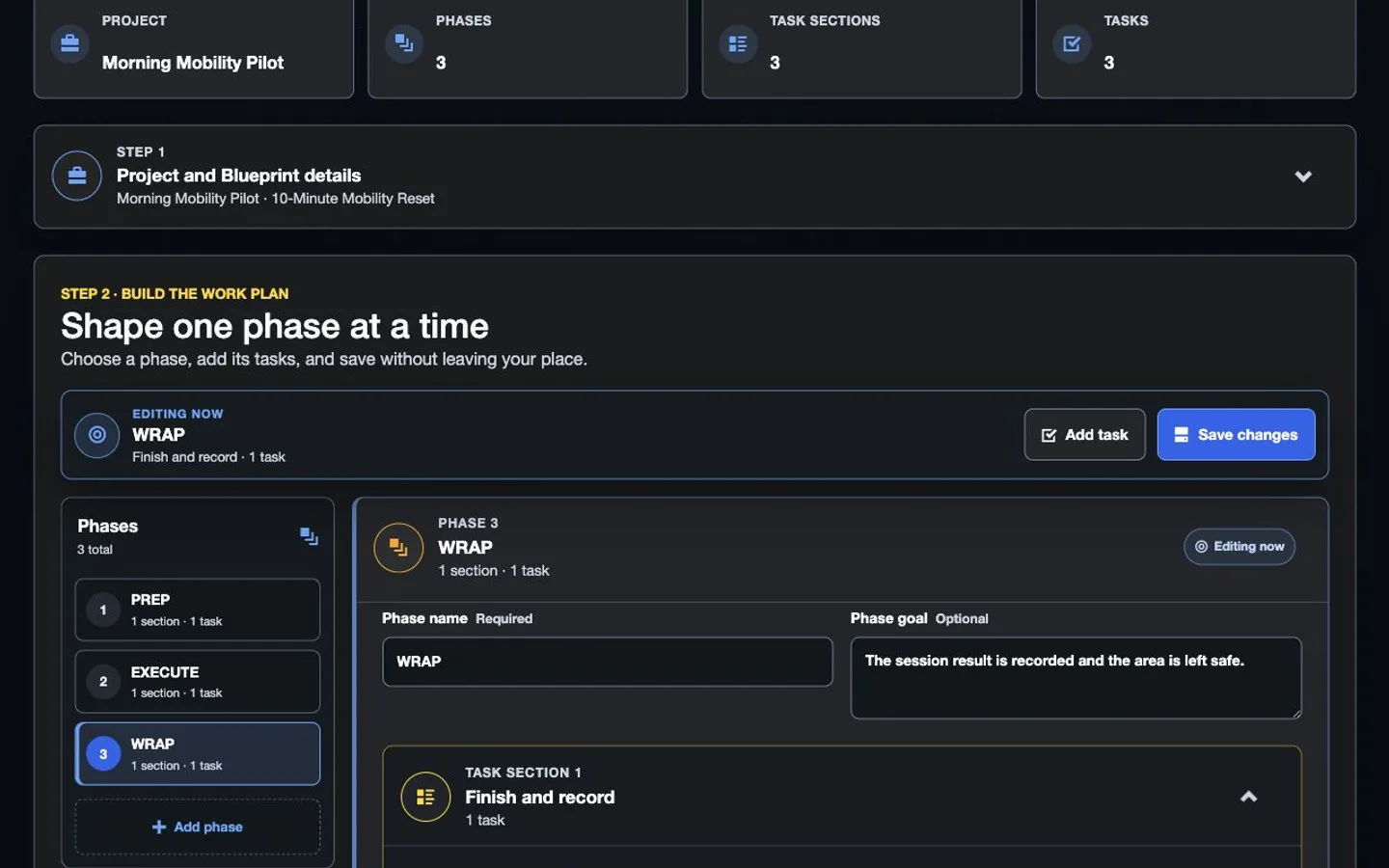
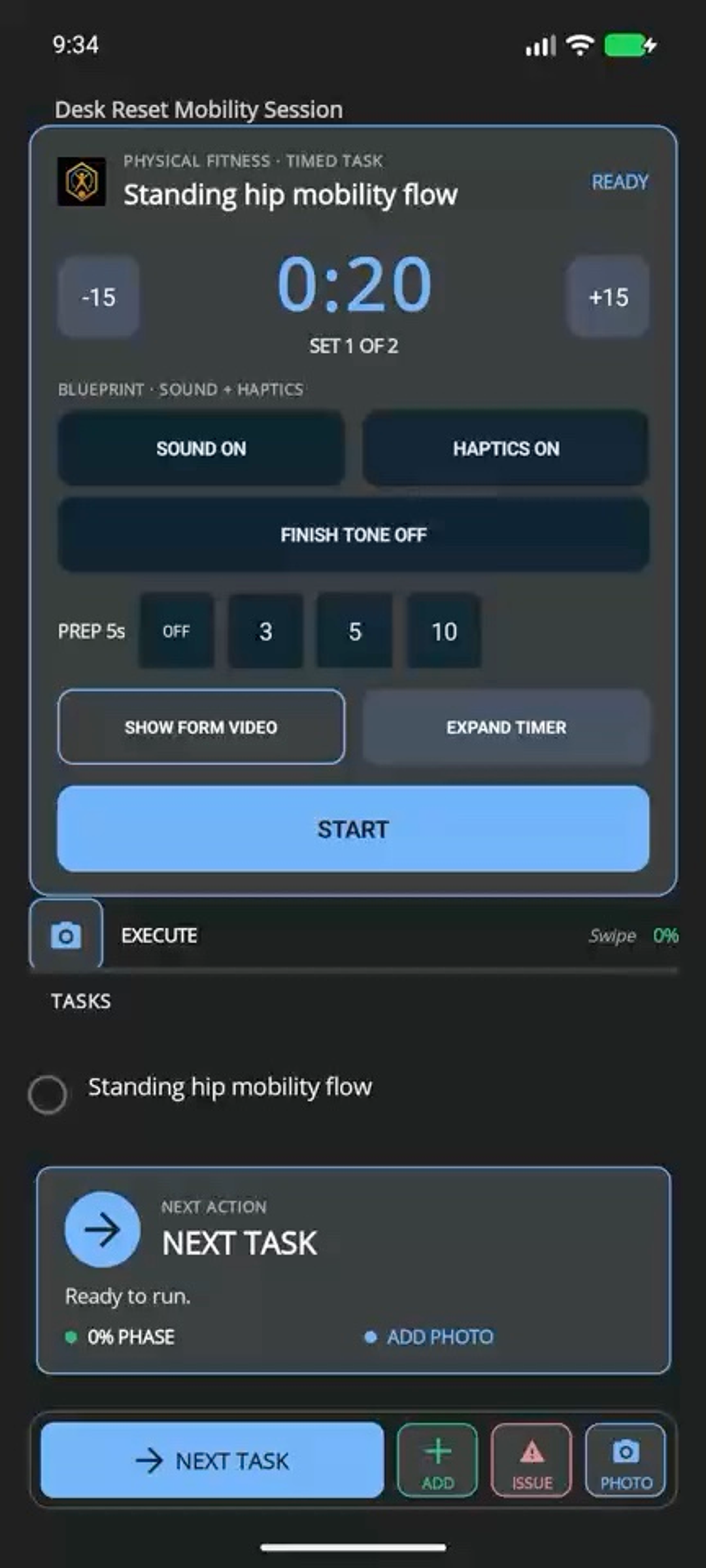
Plan on web. Work on mobile.
Write on web. Follow the timed task on mobile.
The example shows the timer and resume options. It does not prove correct form, treatment progress, a diagnosis, or a clinical result.
Web app
Mobile app
Plan, guide, and share
Choose the feature for your next goal.
Why this helps
MoveSync guides movement, TeamSync coordinates the team, and EarnSync offers a separate path for approved public expertise.
Guide with MoveSync
Benefit details
Turn reviewed instructions into ordered movements, preparation tips, timers, rest, and clear progress.
Coordinate with TeamSync
Benefit details
Give practice work a named owner and show when an update is delayed.
Share with EarnSync
Apply to share approved public expertise with a clear paid-relationship label.
Choose a plan
Choose the option that matches your work.
See the pricing page for current prices, limits, checkout, and access.
Subscription plan
Pro
Solo professional plan For a solo practitioner building repeatable client plans and reviewing progress. Build a repeatable solo practice with expanded workflows, publishing, creator tools, and client-ready reporting. Compare ProSee other access options
Subscription plan
Team
Team workspace plan For practices that need shared templates, named ownership, and controlled team handoffs. Coordinate shared workspaces, named owners, role-aware handoffs, shared templates, and team reporting. Compare TeamCompare more ways to buy
Check the pricing page for current prices and access. Comparing an option does not buy it.
See all stepsEach step shows the owner, the next action, and what changes when plans change.
How the work flows
Move from a reusable plan to a finished result.
Each step shows the owner, the next action, and what changes when plans change.
- 1
Create the plan
Define the ordered movements, instructions, timing, rest, and optional reference media on the web.
- 2
Review the guidance
Make cues clear and keep diagnoses, treatment notes, and medical records out.
- 3
Follow the MoveSync plan
Use preparation tips and a focused timer that can resume after an interruption.
- 4
Review what happened
Review progress, coordinate team delivery, or prepare safe public expertise for creator review.
See related featuresEach card shows current availability and links to a simple feature guide.
Features for this work
Use only the features you need.
Each card shows current availability and links to a simple feature guide.
 Mobile testing
MoveSync
Build a guided movement plan on the web. Add a clear timer, optional form video, custom cues, interruption recovery, and an explicit finish action.
Mobile testing
MoveSync
Build a guided movement plan on the web. Add a clear timer, optional form video, custom cues, interruption recovery, and an explicit finish action.
 Selected teams
TeamSync
TeamSync connects named owners, role-aware assignments, queued field updates, and confirmed completion history without pretending every update is live.
Selected teams
TeamSync
TeamSync connects named owners, role-aware assignments, queued field updates, and confirmed completion history without pretending every update is live.
 Creator + promoter
EarnSync
EarnSync connects creator Blueprints, storefronts, promotion, and confirmed earnings. Clicks and estimates do not mean money is owed to you.
Creator + promoter
EarnSync
EarnSync connects creator Blueprints, storefronts, promotion, and confirmed earnings. Clicks and estimates do not mean money is owed to you.
 Planned invite-only pilot
RecurSync
RecurSync is planned to connect a manager-reviewed schedule, assigned work, required evidence, an intended completion receipt, and searchable property history. Public signup and checkout remain closed.
Planned invite-only pilot
RecurSync
RecurSync is planned to connect a manager-reviewed schedule, assigned work, required evidence, an intended completion receipt, and searchable property history. Public signup and checkout remain closed.
What you can use nowGuidance, not medical care
What you can use now
Guidance, not medical care
MoveSync guides a client through an approved Blueprint. TeamSync can coordinate practice work. EarnSync has a separate review for public expertise and must never include private client information.
- Build and review a guided timed plan without publishing private client information.
- Show whether work was interrupted, resumed, waiting, or confirmed.
- Assign practice work only to people with current TeamSync access.
- Send safe public expertise through EarnSync review and clearly label paid relationships.
- Use the work history to discuss progress, not as a diagnosis, certification, or treatment result.
What comes later
Broader regulated deployments, clinical integrations, wearable data, unrestricted creator enrollment, automatic promoter approval, and guaranteed earnings are not promised by this page.
Read common questions6 answers
Questions and answers
Common questions
Is MoveSync a medical or clinical system?
No. MoveSync guides someone through a movement plan. It does not diagnose, recommend treatment, certify correct form, or prove a clinical result.
Can a practitioner create a plan for a client?
Yes. The web app can organize movements, timing, cues, and optional form videos for the client to follow on mobile.
How does TeamSync fit a training or physical-therapy practice?
Practices can use TeamSync for shared templates, named task owners, and clear handoffs. TeamSync does not check clinical decisions, credentials, treatment, or results.
Can a trainer or physical therapist use EarnSync?
An expert may apply to publish approved public Blueprints or join an ambassador program. HiveSync tracks earnings only after an approved purchase is confirmed. Never include private client information.
Should patient details appear in public plans?
No. Keep diagnoses, protected health information, and unnecessary sensitive details out of public, marketplace, and promoter-facing content.
Which plan fits a small practice?
Pro is the solo starting point. Team is the path when several practitioners need shared templates, ownership, and handoffs.