Mobile execution app

Hive Sync Mobile Execution App

Try the mobile field app in two minutes.

Scan from desktop, install on your phone, and open free starter Blueprints built for real field execution: prep the job, run the checklist, capture proof, and wrap without turning the phone into a checkout screen.

Free starter Blueprints Samples for the first mobile run
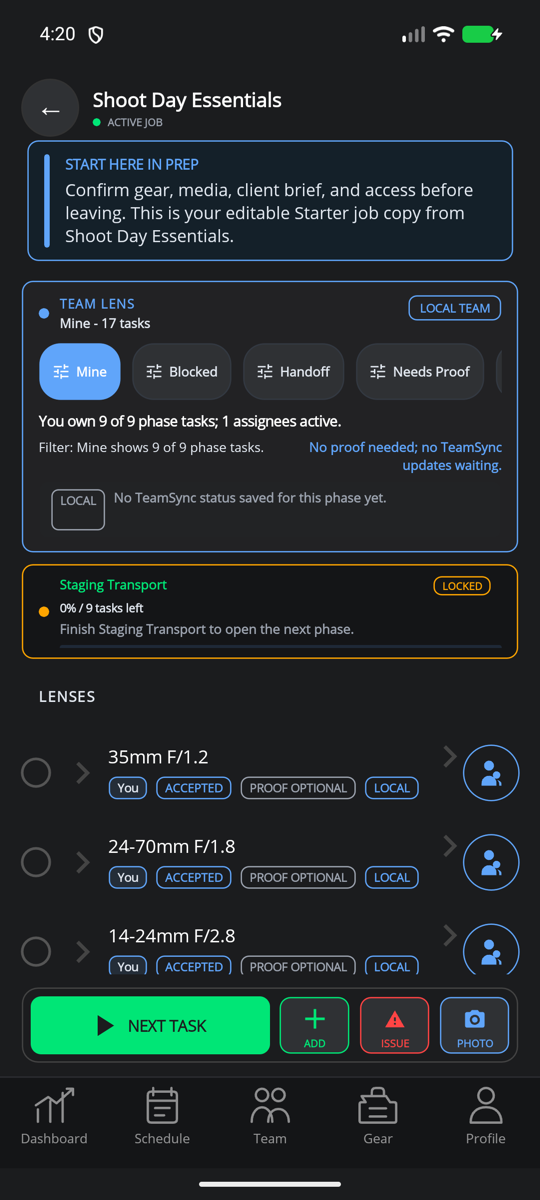
Shoot Day Essentials PREP
Location Handoff EXECUTE
Proof Capture WRAP
After install

What opens after install

The mobile handoff lands on useful field surfaces instead of an empty app shell.

9:41 Starter Library
Starter Blueprint Library Free starter examples Free
PREP
EXECUTE
WRAP
Shoot Day EssentialsPREP sample
Location HandoffEXECUTE sample
Proof CaptureWRAP sample
Offline ready
PREP checklist

Review call time, gear, crew ownership, route notes, and readiness before the job starts.

Proof capture

Capture photos, notes, exceptions, and wrap confirmations that can feed reports later.

Mobile by plan

What mobile includes by plan

Mobile is the execution surface. The web command center still owns paid plans, publishing, reports, teams, and account administration.

Free Start executing

Open free starters, restore purchased or free workflows, and capture basic Hive-branded proof inputs.

Pro Run repeatable work

Use owned workflows in the field, capture proof, and build report-ready history for client closeout.

Studio Team Coordinate crews

Receive assigned owners, role handoffs, shared status, and TeamSync readback when team access is enabled.

Enterprise Execute governed systems

Support private catalogs, rollout controls, audit expectations, and field execution under web-administered policy.

Compare plans
PREP

Arrive ready

Review the call sheet, shot list, route notes, gear, crew ownership, and risk details before the day starts.

  • Owned and free workflow restore
  • Gear and supplies manifests
  • Route, stops, and readiness checks
EXECUTE

Stay focused on site

Use a calm field mode for the current step, blocked states, skipped reasons, owner handoffs, and offline-safe progress.

  • Offline-first checklist execution
  • Focused step-by-step guidance
  • Team assignment readback where enabled
WRAP

Close with proof

Capture photos, notes, location, signatures, exceptions, and wrap confirmations that can feed reports later.

  • Proof and exception capture
  • Pack-out and restock follow-up
  • Client-ready report inputs
Use cases

Who opens the mobile app?

Different roles use the same field surface after the web workspace, storefront, or plan has done its job.

One-time buyer

Buys or claims on web, then opens the confirmed workflow in mobile for a specific shoot or job.

Solo pro

Runs repeatable prep, captures proof, and protects client trust without managing a heavy team workspace.

Studio crew

Receives assigned owners, handoff context, and field status when Studio Team access is enabled.

Creator

Sells the Blueprint on web, then earns trust because buyers can actually execute it in the field.

Web to mobile

Access follows confirmed ownership, not a client-side callback.

Web checkout, account setup, publishing, pricing, reports, and team administration stay in the web workspace. Mobile picks up already-owned, free, or policy-allowed workflows and keeps field execution truthful when the network gets messy.

  1. 1Preview or buy on web
  2. 2Sign in and restore access
  3. 3Run PREP, EXECUTE, WRAP
  4. 4Capture proof for reports
Reload 🗙