HiveSync Build a movement planAccount required

Build and follow timed movement plans.

Build a guided movement plan on the web.

What it does

Add a clear timer, optional form video, custom cues, interruption recovery, and an explicit finish action.

Stay focused on the movement, not the phone.

Keep the session clear and easy to follow.

How it helps

Use planned holds, sets and rest, or timed rounds with preparation time, large controls, optional media, and an honest result.

1

Review the movement

See the form cue, timing, preparation, sets or rounds, and optional media.

2

Follow the timer

Use the large timer, clear cues, and simple controls during the movement.

3

Confirm the result

Save the real outcome once and keep local, queued, or confirmed status visible.

Who it helps

Who can use MoveSync?

Choose the example closest to your goal.

People following a plan

Stay focused while completing the next movement.
People following a plan details

Use large controls, preparation time, sound or haptics, optional form video, and honest Resume, Restart, or End early recovery after an interruption.

Open free mobility starter

Yoga instructors and personal trainers

Turn a coaching plan into guided movement.
Yoga instructors and personal trainers details

Set timing, sets, rest, cues, optional form videos, and finish rules so a client can follow the plan from their phone.

See the practitioner guide

Physical-therapy practitioners

Guide a non-clinical movement routine.

Share exercises, timing, and optional form media.

Physical-therapy practitioners details

Keep diagnoses, treatment claims, medical records, and result guarantees outside MoveSync.

Read non-clinical guidance

Fitness influencers and brand ambassadors

Demonstrate a clear plan before sharing it.
Fitness influencers and brand ambassadors details

Use current MoveSync timing and optional form videos with made-up data, avoid clinical or performance claims, and share the approved Blueprint through a clearly labeled EarnSync path.

See creator sharing guidance

Web and mobile

Plan on the web. Work on mobile.

HiveSync / MoveSync Web app · example data

Blueprint timing setup

Creators set the timing, preparation, sets or rounds, cues, adjustment rules, and finish rules.

Run timed holds, sets with rest, and interval loops. Ready to review
Choose preparation, sound, haptic, and completion preferences. Ready to review
Resume a saved session after an interruption. Ready to review
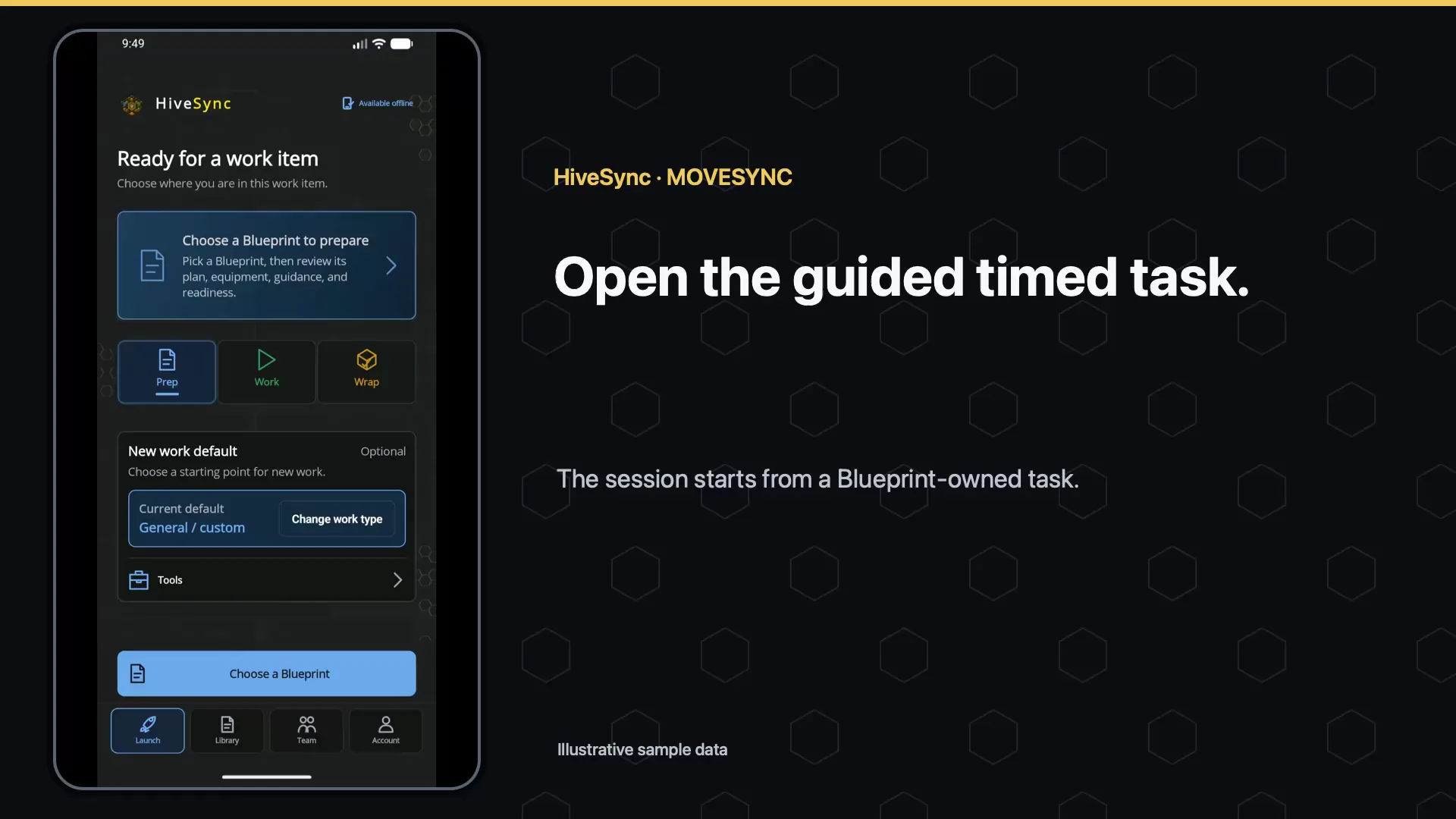
Focused mobile guidance The timer owns the visual hierarchy while optional form media, sound, haptics, and recovery remain user controlled. App screen · example data
HiveSync mobile MoveSync screen showing a guided timed mobility task with preparation, sound, haptics, and set controls using demo data
More examples

Open another reviewed example when you want more detail.

Docked-to-floating task reference Move an optional form video into a floating player while the timer stays visible and can be controlled separately. App screen · example data · Objective demo.

Objective: Keep the movement reference visible without covering the timer.

  1. Start: The optional form reference is docked above the timed task.
  2. Action: Move the reference into the floating player.
  3. Result: The reference floats while the timer and its controls remain visible separately.

Objective demo · reviewed Aug 11, 2026

MoveSync guided mobility task moving an illustrative task-reference clip from docked to floating while the timer remains visible using illustrative demo data

Mobile testing

Built and still being tested

Timed holds, sets and rest, interval loops, interruption recovery, saved results, and confirmation are built.

Availability details

Testing on deployed apps and physical devices continues.

Included with approved Blueprints you own or receive for free. Access still follows the current plan and Blueprint rules. Compare plans
  • Run timed holds, sets with rest, and interval loops.
  • Choose preparation, sound, haptic, and completion preferences.
  • Resume a saved session after an interruption.
  • Show whether a session is complete, ended early, waiting, confirmed, or failed.
What comes later

Planned: more background testing, Android and iPhone cue testing, and wider accessibility checks. Wearables, calorie tracking, diagnoses, treatment, and clinical results are not included.

Questions

Open the answer you need.

Is MoveSync a medical or health-tracking product?

No. It guides timed fitness and movement plans. It does not claim diagnosis, treatment, calories, health benefits, or clinical compliance.

What happens if the app is interrupted?

MoveSync saves the session so you can choose Resume, Restart, or End early without showing work as complete when it is not.

Does reaching zero always complete the task?

No. The Blueprint decides how a task finishes. By default, you must tap Finish. Work that requires completion evidence stays incomplete until that completion evidence is added.

Where does MoveSync run?

Set up and review the Blueprint on the web. Follow the timed plan in the HiveSync mobile app.

Build and follow timed movement plans.